A Teacher’s Guide to Cool Kindergarten

When I first created CoolKindergarten.com, my goal was simple: give kindergarteners an independent, kinder-friendly place to play, learn, and build skills online. Years later, it’s become one of my most shared resources for computer lab, centers, and at-home practice—so I wanted to give it a fresh spotlight and gather all of my favorite links in one place for you.
If you’re looking for free kindergarten online games, easy navigation for young learners, and a safe place for students to click without ads or distractions, this guide will walk you through how it works and where to start.
What is Cool Kindergarten
CoolKindergarten.com is a curated, kinder-friendly homepage designed so students can independently access free, standards-aligned online games in reading and math.
Every link on the site is:
- hand-selected
- standards-based
- age-appropriate
- simple enough for kindergarteners to navigate independently (with minimal introduction./instruction)
Teachers use it for:
- computer stations
- computer lab
- early finishers
- substitute plans
- distance or eLearning days
- at-home practice
It’s the most streamlined way I know to help students access ABC games, phonics practice, number recognition activities, and kindergarten math games—all without you needing to bookmark 20+ different websites.
Why Teachers Love It
Here’s what makes Cool Kindergarten work so well in real classrooms:
- Kinder-friendly interface (big buttons, simple layout)
- Independent navigation — students learn where to click after a single mini-lesson
- Consistent routine so they can use it week after week
- Free resources only (no sign-ins required)
- Perfect for a full class in computer lab or a small group computer center
It’s built from a teacher’s perspective: fast setup, minimal explaining, maximum independence.
My Favorite Pages on Cool Kindergarten
Here are the pages I recommend most—these also happen to be the ones teachers tell me their students return to again and again. Use these links anywhere you want to help boost navigation and SEO for Cool Kindergarten.
1. Alphabet Games
Perfect for letter identification, matching uppercase/lowercase, and phonics mini-review.
2. Sight Word Practice
A collection of sight word games that kinders can navigate independently.
3. Free Kindergarten Math Games
From number recognition to addition—these games support early numeracy skills while keeping students engaged.
4. Holiday and Seasonal Themed activities
I’m always working on adding in fun-themed content into holiday or seasonal pages. You can usually find them right on the homepage, depending upon the time of the year, but here are some favorites:
- Fall games and activities
- Halloween games
- St. Patrick’s Day activities and games
- Valentine’s Day games for kindergarten
- Earth Day videos and games
If you want to create a routine for computer stations, these pages are the good places to check out.
How Students Use It in the Classroom
CoolKindergarten is the hub kids work from. You tell them (or show them using the posters I’ve included down below) what content you want them to work on.
- They navigate to the page you directed them to.
- They work through the games and activities in order.
- Every time they work on a new activity, it opens in a new tab.
- When the activity or video is finished, they exit out of that tab and are returned to their list of tasks on CoolKindergarten.
- They simply click on the next item on the list and continue working.
So, teach your kinders how to use the “x” on the browser tabs, what the end of some activities feel like (until they get the hang of it) and you’re practically on auto-pilot after that!

One of the biggest wins with Cool Kindergarten is how quickly students learn to navigate. A single mini-lesson or two is usually all it takes.
And let’s be real – not all kids work at the same pace which can make providing content on computers difficult if it’s not open-ended. If your students finish early on CoolK, they can always play any game from the content you picked for them to play again, they could listen to audio stories, watch math videos or play hand-selected “just for fun” games.
Here’s what I did each week in computer lab
It can be helpful to run through the games in the list with all kids up close so they can see/experience each game, even if it’s just super-quick.
I would usually set aside 3-5 minutes in computer lab to open each game, explain what to do (if needed) or let them see the first 10-20 seconds of content (if the game walks them through it or it’s familiar) and remind them how to exit out of the tab once done.
I’d do that for each numbered game before sending them each to their own computers.
Side note: if a game was never-ending, I’d set an expectation or limit, like “Play this 5 times, then exit out.”
Bonus Teaching Posters
If your students will be using CoolKindergarten regularly, these printable posters make navigation even easier.
They match each content area on the site so students immediately know where to click.
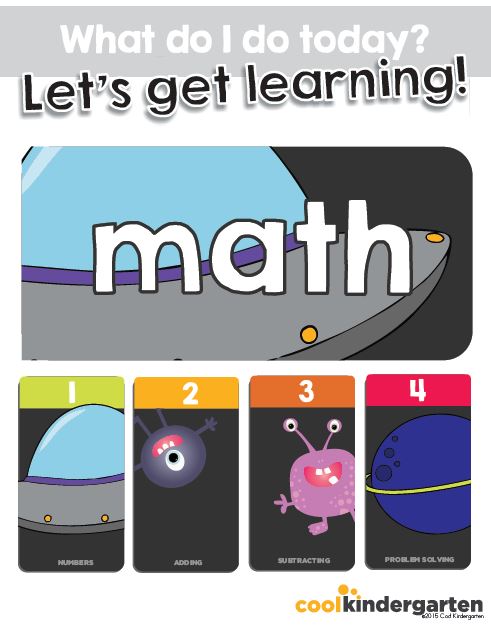
Go to Download Bonus Teaching Posters
CoolKindergarten has grown into one of my favorite tools for building independence at the computer. Whether you use it daily or just for special routines, the simple navigation and high-quality games make it a reliable resource all year long.
Plus, I work to update it regularly so drop me a comment with content you’d love to see added.
If you try any of the pages above, I’d love to hear which ones your students enjoy the most!